Add KEYZY to a JUCE Project
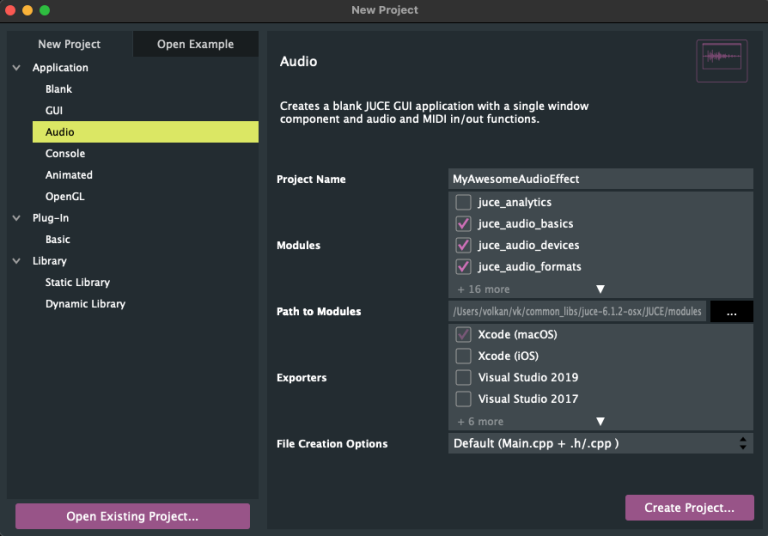
Create a New JUCE Audio Project
- Open Projucer
- Click to File -> New Project…
- Select Audio under Application
- Change Project Name
- Click to “Create Project…”
Add KEYZY C++ Static Library to The Project
- Download KEYZY C++ Static Library
- Unzip it (for example your Downloads folder) and see KeyzyClientLibraryx.x.x folder
- Create “ExternalStaticLibs” folder under your main project folder
- Copy KeyzyClientLibraryx.x.x folder to “ExternalStaticLibs” folder
- Get back to the Projucer app
XCode
- Select your Xcode exporter
- Put “KeyzyClient” text into External Libraries to Link

- Open Debug configuration under your exporter
- Copy this path into Header Search Paths
../../ExternalStaticLibs/KeyzyClientLibraryX.X.X/{{configuration_folder}}/Include
- Copy this path into Extra Library Search Paths
../../ExternalStaticLibs/KeyzyClientLibraryX.X.X/{{configuration_folder}}/Lib
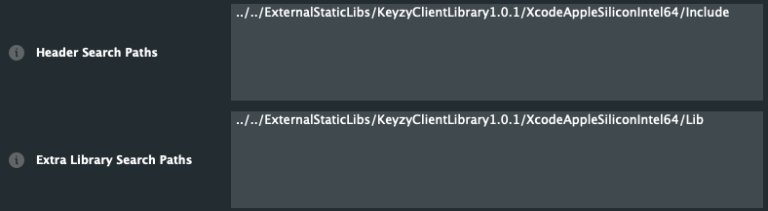
- Follow the same steps for Release configuration under your exporter
Windows
- Select your Visual Studio exporter
- Put “KeyzyClient.lib” text into External Libraries to Link

- Open Debug configuration under your exporter
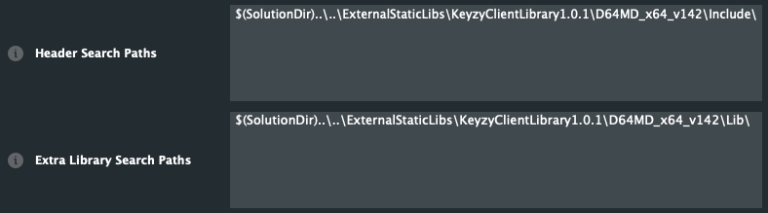
- Copy this path into Header Search Paths
$(SolutionDir)..\..\ExternalStaticLibs\KeyzyClientLibraryX.X.X\{{configuration_folder}}\Include\
- Copy this path into Extra Library Search Paths
$(SolutionDir)..\..\ExternalStaticLibs\KeyzyClientLibraryX.X.X\{{configuration_folder}}\Lib\